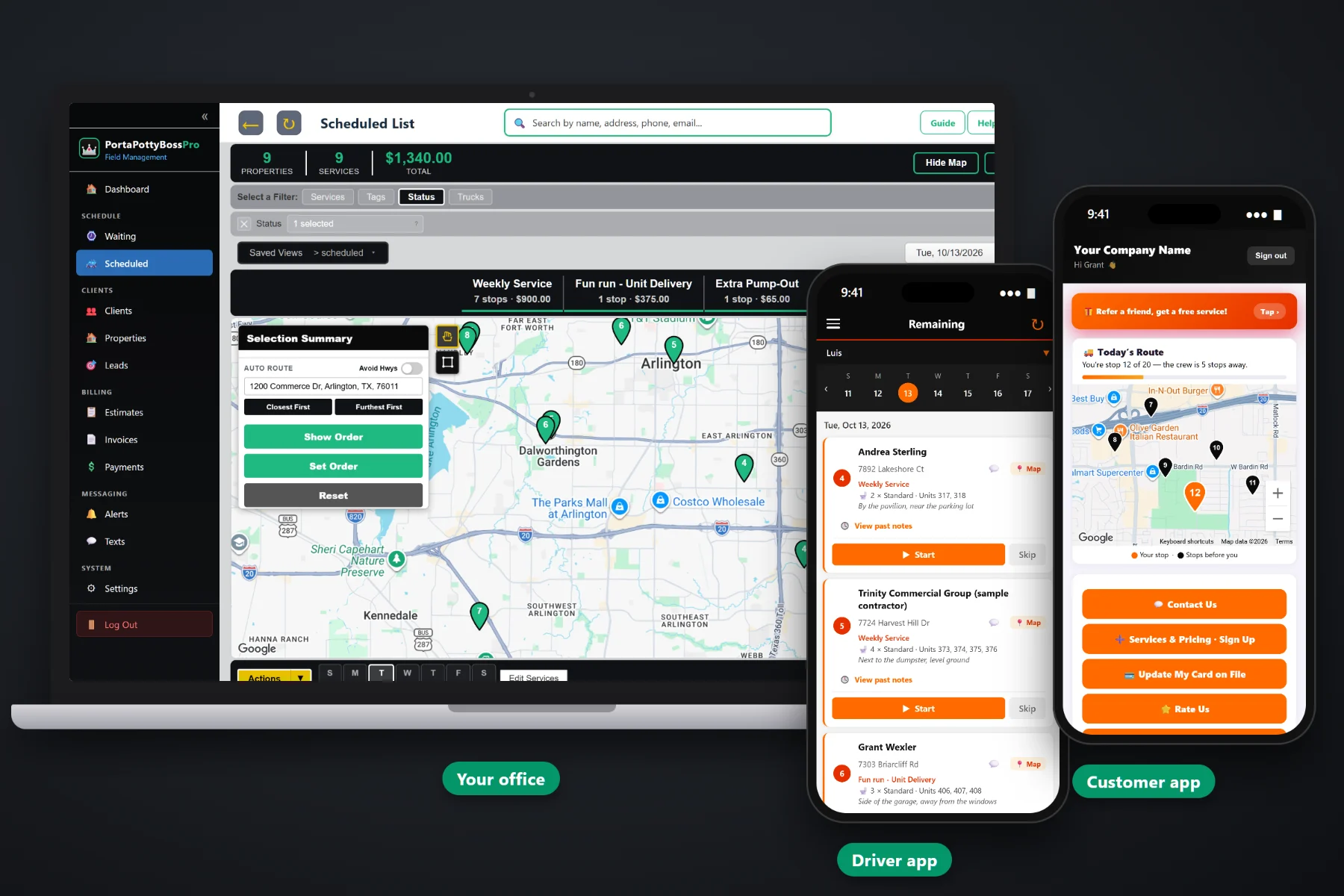
A portable toilet company runs on details nobody can keep in their head for long: which units are on which site, where they sit, when each site is due for service, how long a rental has been out, and who still owes you. PortaPottyBossPro puts all of it on one system, from the first call to the paid invoice. A Waiting List of every delivery, service and pickup on a live map, a dispatch board by truck and day, units on every job, rental tracking with extra days billed automatically, a driver app, a customer app, texting and billing.
Plans start at $59/month and you are never billed per user, so every driver, office person and busy-season fill-in gets a login. The Waiting List, dispatch board, rental tracking, driver app, customer app and billing are part of the platform, not add-ons you find out about after signing. This page covers the software end to end; for the product tour, start at PortaPottyBossPro.
Every delivery, weekly service, extra pump-out and pickup that still needs to go out, on a live map, colored not due yet, due now or overdue.
Jobs by day and truck on a week strip. Drag them into order or auto-route Closest First or Furthest First from the yard.
Unit type, quantity, unit numbers and placement notes, shown under the address on the office lists and the driver's phone.
Delivered date, days included and a per-day rate after. "Out since 10/3 (12 days, 4 extra)" on the list, extra days on the invoice automatically.
Drivers run the day in route order from their phone. Customers watch the route, request service and pay invoices from theirs.
Invoices from completed jobs, card on file, auto-charge, and one monthly statement covering every site a contractor rents at.
Generic scheduling tools stop at the address. A portable toilet job needs more: what's on the site, how many, which unit numbers, where they go, and when the rental started. PortaPottyBossPro keeps all of that on the job, so the office, the driver and the invoice are always talking about the same units.
Every job follows the same path, and nobody retypes it along the way. The address the office enters is the one the driver navigates to, and the units the driver drops are the units the invoice bills for.
A phone call, a website request form, an online sign-up with a card, or an estimate the customer approves online. Sign-ups convert to a client in one click.
Deliveries, weekly services, extra pump-outs and pickups on a live map, colored by whether each one is not due yet, due now or overdue.
Assign jobs to a truck and day, then drag or auto-route from the yard. The board totals stops and dollars per service.
Drivers run the day in route order on their phone. Complete charges the card on file and creates the invoice, or rolls onto a monthly statement.
Most portable toilet companies start on a notebook, a whiteboard in the yard and a spreadsheet on the office computer. That works until the company grows past what one person can hold in their head.
Ask any owner how the week really runs and you'll hear the same story: a route sheet that went wrong the first time a truck ran late, a gate code in a text from last month, a party unit that stayed out three weeks on a three-day rental, and invoices that never went out because the ticket fell between the seats.
Those aren't people problems. They're memory problems. When weekly service comes due on its own, units and placement ride along on every job, and rental days are counted for you, nothing depends on someone remembering.
PortaPottyBossPro keeps the customer, the site, the units and the money in one place, from the first call to the paid invoice.
Everything here is built for the way portable toilet companies actually work: units on sites, weekly service, rentals with a clock, contractors with many projects, and trucks that need to stay full.
A live map and list of every delivery, weekly service, extra pump-out and pickup that still needs to go out, colored by due status.
Each service has minimum days between visits, so sites drop off when serviced and come back on their own when due.
Jobs by day on a week strip, filtered by truck, with drag-to-order and auto-routing Closest First or Furthest First.
Unit type, quantity, unit numbers and placement notes under the address everywhere the job appears.
Delivered and picked-up dates, days included and a per-day rate after, with days out shown on every list.
Extra rental days added to the invoice automatically as their own line. No date math at night.
Company login plus personal PIN, jobs in route order, Map button, Start, Skip and Complete, photos and notes.
Crew locations on the office map, so you know which truck is closest to a same-day request.
Customers see today's route on a live map, request service, sign up, update their card, see invoices and pay.
Two-way texting from the office, plus automated alerts the night before, when they're next, and when the tech arrives.
Estimates approved online become scheduled services. Website sign-ups with a card convert to clients in one click.
Invoices from completed jobs with sales tax per site, card on file, auto-charge, online payment and past-due follow-up.
One statement a month covering every job at every site, each line labeled with the site address.
One client with many job sites, site contacts, gate and access notes, tags and custom fields.
Bring your existing customer list in from a spreadsheet or another system and start building sites the same day.
Employees with PINs and truck assignments, office user roles, and a time clock. Never billed per user.
The one-truck owner who drives the route in the morning and does invoices at night needs the system to remember the weekly services and count the rental days. The company with six trucks, a dispatcher and a bookkeeper needs everyone working off the same plan. The daily flow is the same at both sizes, so the same software fits both: a small company just has fewer trucks on the board. For a full walkthrough, read Porta Potty Rental Software: The Complete Guide for Portable Toilet Companies.
Customers choose their alerts: the night before, when they're next, and when the tech arrives. On service day the customer app shows the route on a live map, with a line like "You're stop 12 of 20 — the crew is 5 stops away." When the driver taps Complete, the card on file can be charged and the invoice created. Contractors set to Monthly get one statement covering every site instead of a stack of small bills.
Pick the plan that fits your operation. Every plan starts with a 14-day free trial and no credit card, and most companies are running real jobs within a day.
Compare plans on the pricing page.
It holds your whole operation in one place: customers and their job sites, the units on each site, weekly service due dates, rentals and extra days, each truck's day, the driver's phone, customer alerts and billing. In PortaPottyBossPro a job goes from the first call to the Waiting List, onto a truck on the dispatch board, to the driver's phone, and becomes an invoice when the driver completes it.
No. A one-truck owner uses it to stop missing weekly services and extra rental days and to stop doing invoices at night. A multi-truck company uses it to keep the office, dispatch and drivers on the same plan. The daily flow is the same at either size.
Each service has a minimum number of days between visits. When a service is completed the site drops off the Waiting List, and it comes back on its own when it is due again. Pins are colored not due yet, due now, or overdue once a site is more than 7 days past due.
Each rental records the delivered date, the picked-up date, the days included and a per-day rate after that. The lists show how long units have been out and how many days are extra, and the extra days are added to the invoice automatically as an "Extra rental days" line.
Yes. PortaPottyBossPro takes a CSV import of an existing customer list. After the import you add job sites, units and services for your active customers, and most companies are running real jobs within a day.
Start is $59/month, Pro is $89/month, and Crew is $199/month, with monthly text allowances of 500, 1,000 and 2,000 segments sent plus received. You are never billed per user, and every plan starts with a 14-day free trial with no credit card.
Want to see it running? Open the live demo, or see the full PortaPottyBossPro platform overview.
Practical reading on what the software does, the daily workflow, the Waiting List and dispatch, units and rentals, the driver and customer apps, texting, billing, switching systems, pricing and choosing well.
Waiting List, dispatch board, units on every job, rental tracking, driver app, customer app and billing. Try PortaPottyBossPro free for 14 days.