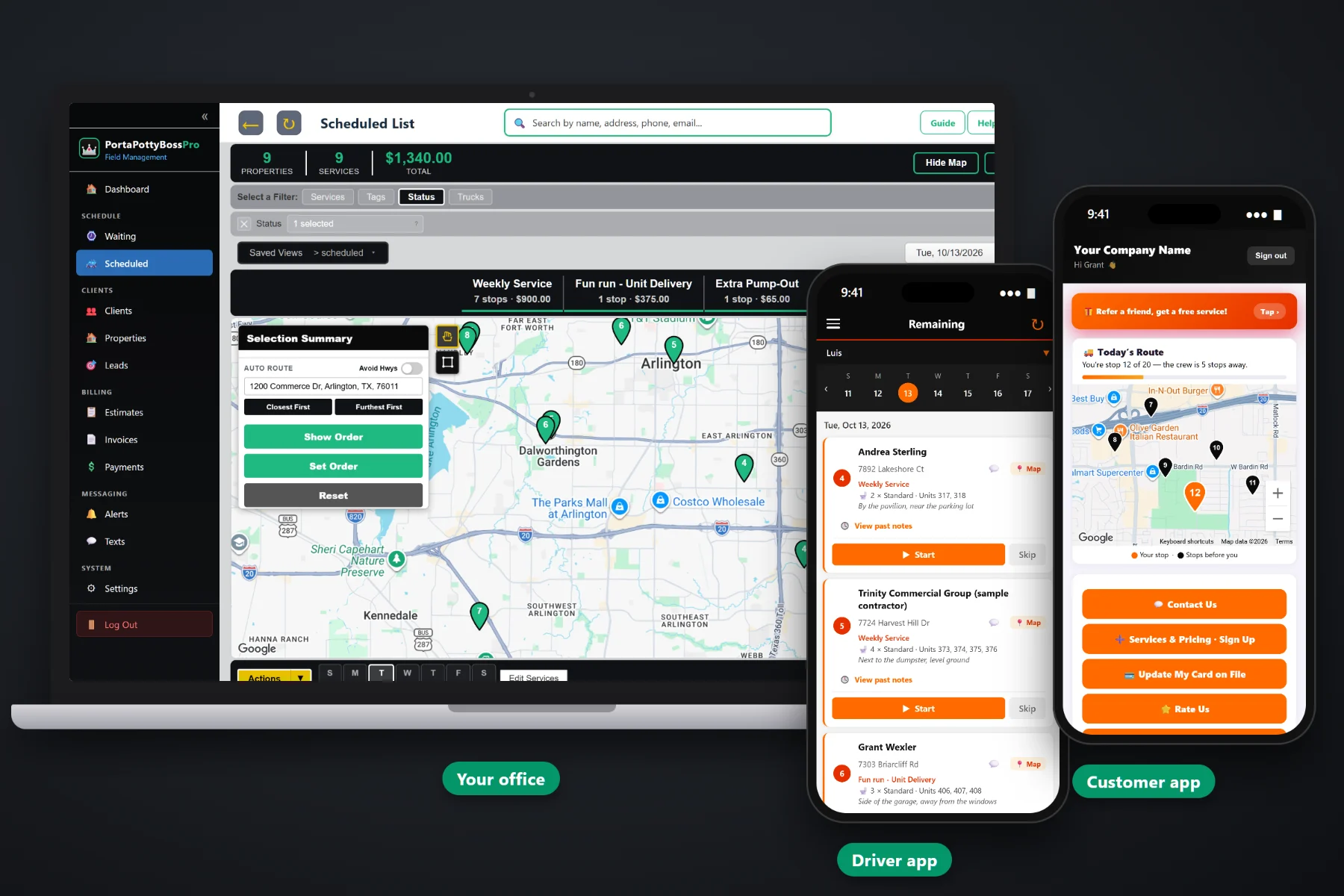
A porta potty invoice is not one charge. It is a rental that runs by the day or the month, a weekly service that runs by the visit, a delivery and a pickup, and the extras that only happen sometimes: an added pump-out, a cleaning fee, a unit that stayed out two weeks longer than planned. PortaPottyBossPro builds the invoice from the work your trucks actually did, adds extra rental days automatically, figures sales tax by site, charges the card on file, and sends contractors one monthly statement covering every site.
Plans start at $59/month and you are never billed per user, so the office, the drivers and the owner all work from the same records. Invoicing, card on file, monthly statements and the customer app are part of the platform, not an add-on you find out about after signing. To see how billing fits with dispatch, the driver app and the customer app, start at PortaPottyBossPro and then dig into the billing side here.
Unit rental, each weekly service with its date, delivery and pickup, each on its own line of one invoice the customer can read.
Set the days included and a per-day rate after. When a unit stays out longer, "Extra rental days" lands on the invoice on its own.
Cards stored through Stripe, captured at sign-up, and charged when the job is completed or on a schedule you set.
Accounts set to Monthly get one statement covering every job at every site, each line labeled with the site address.
Tax is figured for the site where the units sit, so a contractor with jobs in three tax areas gets the right rate on every line.
Customers see their invoices, pay online and update their card on file from their phone, without calling your office.
Customers do not hold invoices because they do not want to pay. They hold them because they cannot tell what a charge was for. PortaPottyBossPro builds each line from the job record, so the unit type, the site address and the date of the work are already there when the bill goes out.
Most porta potty billing problems come from retyping: tickets into a spreadsheet, a spreadsheet into invoices. PortaPottyBossPro bills from the work itself, so the office reviews invoices instead of building them by hand.
Rentals and weekly service by unit type, delivery, pickup, extra pump-outs and fees, with included days and a daily rate for short rentals.
The sign-up form takes the customer's card, and one click turns the sign-up into a client with the card on file.
Each delivery, service, pump-out and pickup is completed in the driver app, with photos and notes kept on the job.
Completed work becomes an invoice and the card is charged, or it rolls onto the account's monthly statement.
Most invoicing tools assume one job, one price, one bill. A portable toilet rental is a unit sitting on a site for weeks, a service that repeats every seven days, and a contractor with units on eight jobs who wants one bill for all of them.
Ask any porta potty owner where the money leaks and you will hear the same list: units that stayed out past the rental and were never billed for the extra days, extra pump-outs written on a ticket that never reached the office, a contractor who got twenty-eight invoices in a month and paid the ones on top of the pile.
None of that is a field problem. The trucks did the work. When the invoice is built from the completed job, the charges that used to slip through land on the bill, with the date, the site and the driver's photos behind them.
PortaPottyBossPro keeps the customer, the sites, the units, the work and the invoices in one place, from the first quote to the paid statement.
Every tool here exists to get each unit, each service and each extra day onto the right invoice, and to get that invoice paid sooner.
Rental, service, delivery, pickup and extras each on their own line, named the way your customers talk.
Delivered date, picked-up date, days included and a per-day rate after, shown as "Out since 10/3 (12 days, 4 extra)".
Extra rental days are added to the invoice on their own when the unit stays out past the included days.
Deliveries and pickups are jobs on the board, and their fees bill when the driver completes them.
Customers can request service in the app, and the extra visit bills on its own dated line.
Driver photos and notes stay with the job, ready when a damage, cleaning or missed-service question comes in.
Cards stored through Stripe, captured on the sign-up form or added by the customer in the app.
Charge the card on file when a job is completed or on a schedule you set.
One statement a month for contractor accounts, every job at every site, each line labeled with the site address.
Tax follows the units, figured for the site where they sit.
Customers see invoices, pay online and update their card from their phone.
Late invoices stay in front of the office, with two-way texting to reach the customer.
Estimates built from your service list, approved online, become scheduled services and then invoices.
See where billing stands from the same records the trucks and the office work from.
Works in the US, Canada, Australia, New Zealand and the UK, billing customers in their own currency.
Plans are Start $59, Pro $89, and Crew $199 per month, not a per-seat charge.
Contractors are the steadiest customers on most porta potty routes and often the slowest to pay, usually because of paperwork. Set a contractor's account to Monthly and they get ONE statement each month covering every job at every one of their sites, each line labeled with the site address and taxed for that site. Their bookkeeper approves one document, and you follow up on one payment instead of a stack. For the full walkthrough of rental billing, read Porta Potty Billing Software: The Complete Guide to Invoicing Portable Toilet Rentals.
Many billing calls are really lookup calls: what was this charge, did my payment go through, how much do I owe. In the customer app, your customers see their invoices line by line, pay online, update their card on file and request an extra pump-out or a pickup. The same app shows their crew on a live map and sends the alerts they chose, so they already know where to find the bill.
Pick the plan that fits your operation. Every plan starts with a 14-day free trial and no credit card.
Compare plans on the pricing page.
Each rental has a delivered date, a picked-up date, the days included in the rental and a per-day rate after that. The office lists show how long each unit has been out and how many days are extra, and the extra days are added to the invoice automatically as an "Extra rental days" line.
Yes. Set the account to Monthly and the contractor gets one statement each month covering every job at every one of their sites, with each line labeled with the site address.
Cards are stored through Stripe. Customers enter their card on the sign-up form or in the customer app, and the card can be charged when a job is completed or on a schedule you set.
Sales tax is figured per site, so the rate follows where the units sit. Confirm the rules for your area with your accountant and set each site's rate to match.
Yes. In the customer app, customers see their invoices, pay online and update their card on file. They can also request service and see their crew on a live map.
Start is $59/month, Pro is $89/month, and Crew is $199/month. You are never billed per user, and every plan starts with a 14-day free trial with no credit card.
Billing is one piece of how PortaPottyBossPro runs a portable toilet company. For dispatch, the driver app, the customer app and texting, see the full platform overview.
Practical reading on porta potty invoices, billing cycles, extra rental days, fees, deposits, card on file, contractor statements, sales tax, past-due follow-up and month-end review.
Rental and service on one invoice, extra days billed automatically, card on file, sales tax by site and one monthly statement for contractors. Try PortaPottyBossPro free for 14 days.