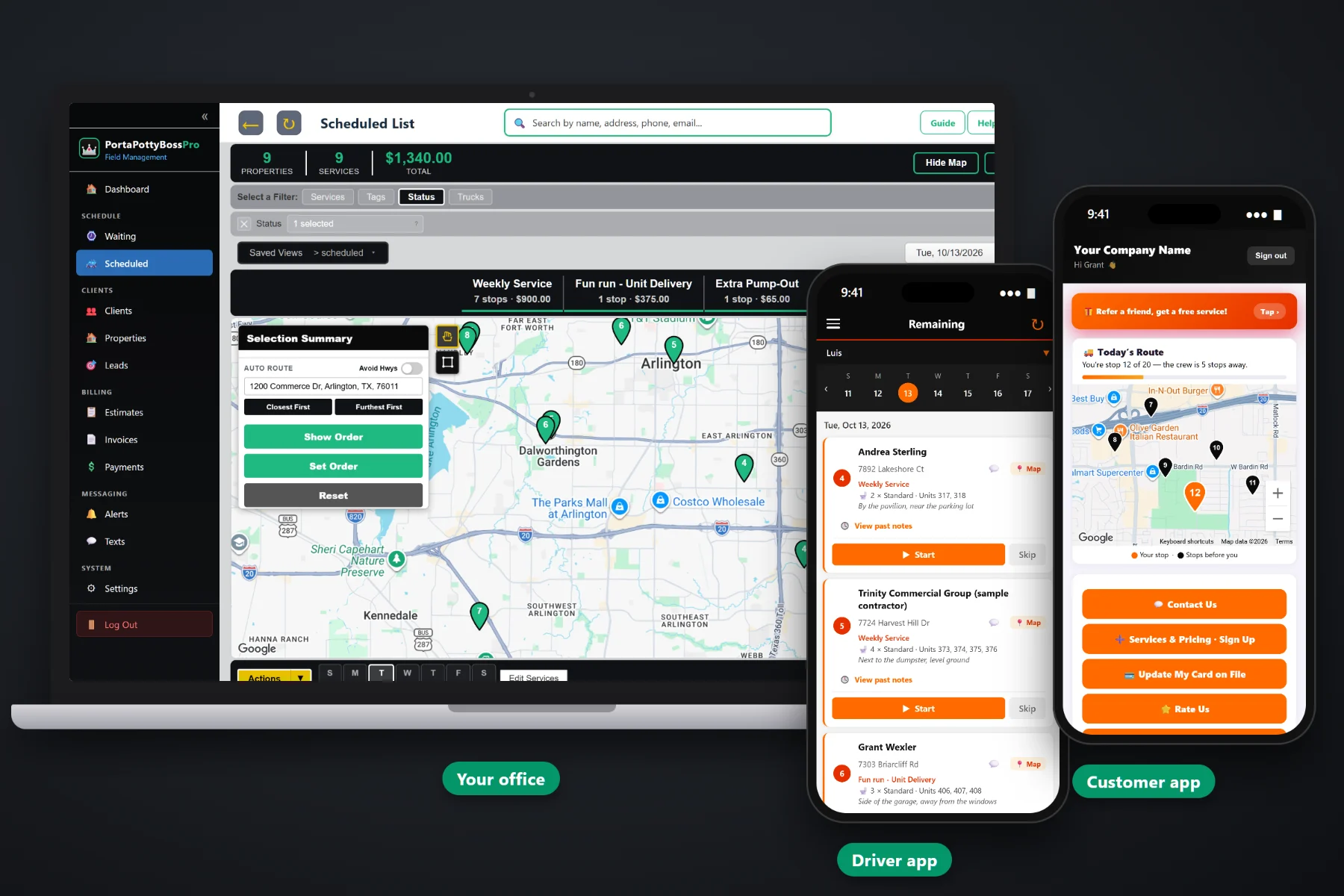
Weekly service is the work that pays the bills, and it is the work that slips first when the schedule lives on a route sheet. PortaPottyBossPro gives every site a minimum number of days between visits, so weekly and twice-weekly sites come due on their own on a live Waiting List map, colored not due, due or overdue. Assign them to trucks, set the route order, and drivers pump, clean, restock and photograph each stop from their phone while customers get reminder and arrival texts.
Plans start at $59/month and you are never billed per user, so every driver and office helper can log in. Recurring service, the Waiting List map, the dispatch board, the driver app and customer alerts are all part of the platform. To see how service scheduling fits with deliveries, rental tracking and billing, start at PortaPottyBossPro and then dig into weekly service here.
Each service carries a minimum number of days between visits. Complete a visit and the site goes quiet until it is due again.
Every weekly service, extra pump-out, delivery and pickup on one live map, colored not due, due now or overdue past a 7-day grace.
Assign due sites to a truck and day, auto-route Closest First or Furthest First from the yard, and see stops and dollars per day.
Unit type, quantity, unit numbers and placement notes under the address, so any driver can service any site.
Drivers photograph the clean, restocked units from the app, and the photos stay with the visit for the day someone says nobody came.
Customers choose night-before, next-on-route and arrival alerts, and they can request an extra pump-out from the customer app.
A paper route sheet only knows what someone wrote on it. When a Tuesday stop gets pushed to Wednesday, nobody moves it back, and two weeks later a superintendent calls. In PortaPottyBossPro, every site keeps its own clock from its last completed visit. Weekly sites come due after seven days, twice-weekly sites after three or four, and anything that slips past the grace period turns overdue on the map.
No more rebuilding the route sheet every Friday. Set each site up once, look at the Waiting List each morning, assign what is due, and watch for overdue pins.
Import your customer list from a CSV, then add each site with its units, unit numbers, placement and gate notes.
Give each service its price and minimum days between visits: seven for weekly, three or four for twice weekly.
Select due and overdue pins on the Waiting List map and assign them to a truck and day. Auto-route or drag the order.
Drivers pump, clean, restock, take photos and tap Complete. The site goes quiet until it comes due again.
Most field service software is built around one-off appointments. A portable toilet company runs hundreds of recurring visits to sites with several units each, on a clock that resets every time the truck leaves. Calendars that repeat every Tuesday cannot tell you which site was really missed.
Ask any porta potty owner how the service week really runs and you will hear about a route binder, a spreadsheet on the office computer, and a driver who simply knows where everything is. Which unit is behind the job trailer. Which gate code changed. Which site got pushed for rain and never got put back.
That works until the driver takes a week off or a holiday shifts every route. When the schedule tracks real completed visits, a missed site shows up on the map in red before it shows up as a complaint.
PortaPottyBossPro keeps the site, its units, its notes, its service rhythm and its billing in one place, from the first delivery to the last pickup.
Every tool here exists to get every site serviced on time, every week, with fewer calls to the office and no sites lost between route sheets.
Weekly, twice-weekly or every other week. Each site comes due from its own last completed visit.
All due work on one live map and list, with pins colored not due, due now or overdue past a 7-day grace.
Requests between regular visits become their own jobs, without disturbing the weekly rhythm.
Jobs by day on a week strip, filtered by truck, with totals of stops and dollars per service.
Closest First or Furthest First from the yard, or drag stops into your own order.
Standard, Deluxe Flushing, ADA, High-Rise, Hand Wash Station and Restroom Trailer, with unit numbers and placement notes.
Codes, hours and site contacts on the job and on the driver's phone at every visit.
Stops in route order, Map button, Start, Skip and Complete, on iPhone and Android with a company login and PIN.
Photos taken on the stop stay with the visit as proof of service and a record of unit condition.
Automated reminders by text and email, plus automatic on-the-way and arrived texts from the driver app.
Customers see their place on today's route on a live map and request service from the customer app.
Customer replies about gate codes and extra service land with the office, tied to the customer.
Stops and dollars per day on the board, plus reports on completed work and billing.
Completed visits become invoices. Charge the card on file on completion or on a schedule.
Contractors on Monthly billing get one statement covering every site, each line labeled with the site address.
Plans are Start $59, Pro $89 and Crew $199 per month, with every driver included.
Due sites move from the Waiting List onto the dispatch board, where each truck's week shows on a strip of days with totals of stops and dollars. Group sites by area so each truck covers a zone each day, auto-route the order, and fit extra pump-outs onto the truck already nearby. Drivers see the same order on their phones, with units and notes on every card. For the full walkthrough, read Portable Toilet Service Scheduling: The Complete Guide for Porta Potty Companies.
Most missed-service calls come from a site contact who did not know the truck was there. Customers choose their own alerts in the customer app: the night before, when they are next on the route, and when the tech arrives. On service day they can watch the route on a live map, and when a crew grows or an event runs long, they can request an extra pump-out from their phone instead of leaving a voicemail. Replies come back to the office through two-way texting.
Pick the plan that fits your operation. Every plan starts with a 14-day free trial and no credit card.
Compare plans on the pricing page.
Each recurring service has a minimum number of days between visits. When a driver completes a visit, the site goes quiet, and once the days have passed it comes back on the Waiting List as due. If it slips past a seven-day grace, it turns overdue. Nobody has to rebuild a route sheet.
Yes. Set the minimum days to match: three or four days for twice-weekly service, seven for weekly, fourteen for every other week, or one day for multi-day events that need daily service.
The site was never completed, so it stays due on the Waiting List until a visit is completed. The office sees it the next morning and assigns it to a truck. It cannot quietly drop off the schedule.
They can request service from the customer app or text the office through two-way texting. The extra pump-out becomes its own job on the Waiting List, separate from the site's regular weekly service.
Their stops in route order, a Map button for navigation, the unit type, quantity, unit numbers and placement notes, access notes like gate codes, and Start, Skip and Complete. They take photos from the app, and on-the-way and arrived texts go to the customer automatically.
Start is $59/month, Pro is $89/month, and Crew is $199/month. You are never billed per user, and every plan starts with a 14-day free trial with no credit card.
Service scheduling is one piece of how PortaPottyBossPro runs a portable toilet company. For deliveries, rental tracking, contractor accounts and billing, see the full platform overview.
Practical reading on weekly and twice-weekly service, the Waiting List, service visits, extra pump-outs, holiday and weather weeks, site access, photos, customer texts, reports and moving your schedule off paper.
Sites that come due on their own, a map of what is due and overdue, stops in route order on every driver's phone, and texts that tell customers you were there. Try PortaPottyBossPro free for 14 days.